Golf GPS Watch Comparison Chart
A golf GPS watch answers one question: how far to the front, middle, and back of the green. Prices range from $100 to over $500, and the features that justify that spread depend on how often you play, where you play, and whether the watch doubles as your daily smartwatch. This chart and the decision rules below will help you match a watch to your actual routine — not just the marketing specs.

The Three Specs That Decide Everything
Battery life separates a tool from a toy. A golf watch that dies on the 14th hole is worse than no watch at all. Golf-specific models from Garmin typically run 10–14 days in smartwatch mode and 20+ hours in GPS mode. Multi-sport watches with AMOLED screens drain faster, so check the GPS-mode number, not the marketing “up to” figure.
Screen type determines whether you can read the number in July glare. Transflective displays (used in Garmin’s Instinct line) stay visible in direct sunlight and sip battery. AMOLED screens look sharper indoors but wash out in bright conditions and consume more power. If you play midday summer rounds, screen type matters more than any other spec.
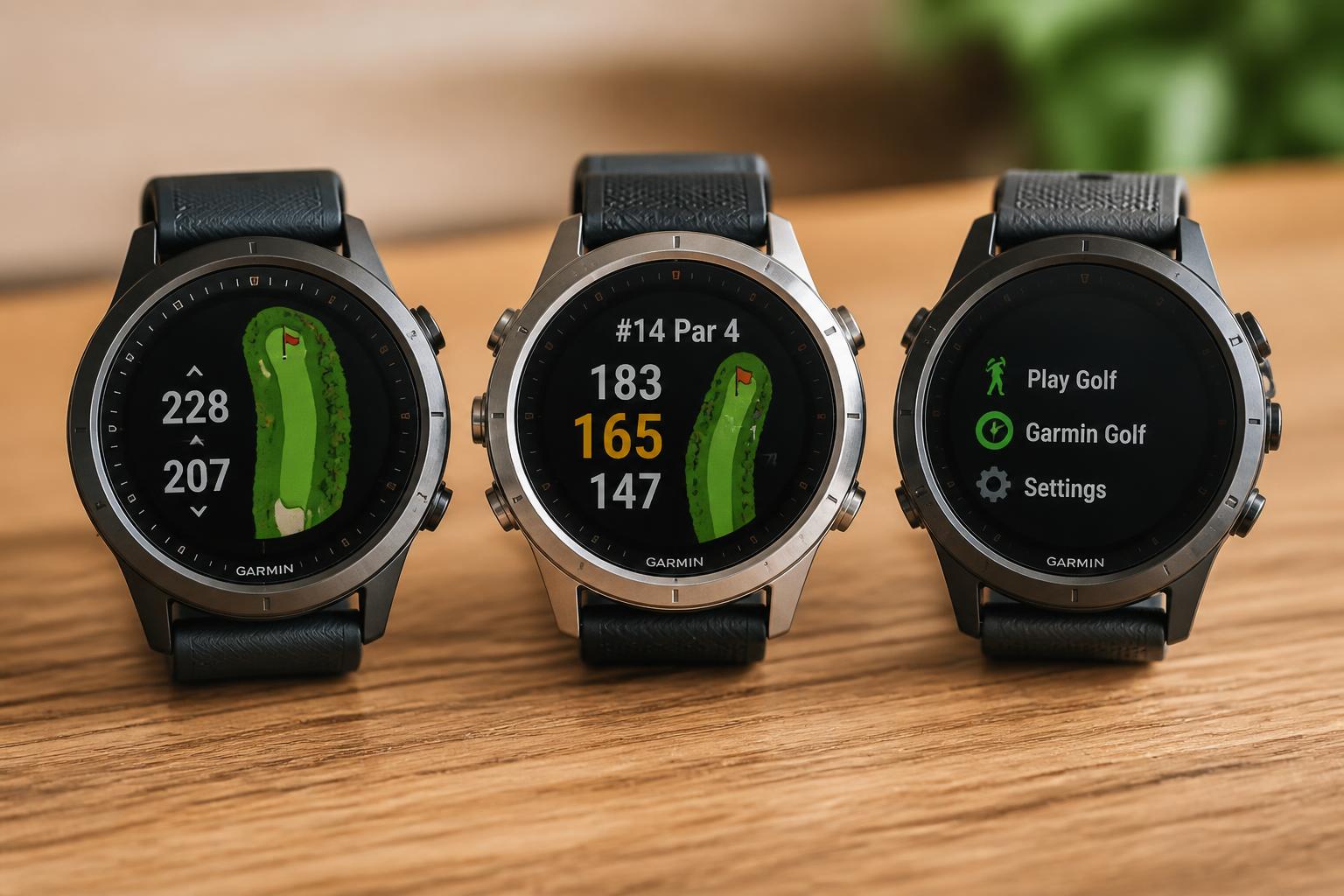
Course data is the hidden variable. Most major brands preload 40,000+ courses, which covers the vast majority of US courses. The real difference is how the watch calculates distance — some account for elevation changes, some don’t. If you play hilly courses, elevation-adjusted distances are worth paying for. If you play flat parkland tracks, basic front/middle/back numbers are all you need.
Side-by-Side: Three Watches With Different Priorities
| Model | Screen | Battery Life | Key Golf Features | Best Fit |
|---|---|---|---|---|
| Garmin Instinct 3 45mm | AMOLED | Up to 18 days (smartwatch) | Built-in flashlight, rugged case, preloaded golf courses | Daily smartwatch users who want a durable all-rounder |
| Garmin Instinct Crossover AMOLED | AMOLED with analog hands | Varies by mode | Hybrid analog/AMOLED display, MIL-STD 810 durability, sapphire lens | Golfers who want a traditional watch look with modern GPS |
| SOUYIE 2026 AI Smart Watch | AMOLED | 21 days (claimed) | Standalone GPS, offline maps, 178 sports modes, 5ATM waterproof | Budget-focused multi-sport users who golf occasionally |
What the Chart Doesn’t Show
The specs tell you what a watch can do. They don’t tell you whether it fits your routine. Here’s the practical breakdown.
If you only play golf and want the simplest device: Choose a dedicated golf watch with physical buttons. Touchscreens fail when your hands are sweaty or gloved. A dedicated golf watch also keeps the interface focused — no fitness notifications popping up over your pre-shot routine.
If you want a daily smartwatch that also does golf: The Garmin Instinct 3 45mm fills this role well. The rugged build handles the course and the gym, and the built-in flashlight is genuinely useful for early tee times or finding a ball in the rough at dusk. The AMOLED display is bright, but expect to charge more often than with a transflective screen.
If you want a hybrid look: The Garmin Instinct Crossover AMOLED pairs analog watch hands with a digital AMOLED display. It’s a niche product, but if you want a watch that works in a boardroom and on a fairway, it’s one of the few options. The sapphire lens and MIL-STD 810 rating mean it can take real abuse.
If you’re on a budget and want multi-sport capability: The SOUYIE 2026 AI Smart Watch offers standalone GPS and offline maps at a fraction of Garmin’s premium price. It’s not golf-specific, but it covers 178 sports modes and includes heart rate, SpO2, and stress monitoring. The 5ATM water resistance means it survives pool time and downpours.
Decision Rules: Match the Watch to Your Game
Use these four rules to narrow your options in under a minute.
Rule 1: Count your rounds per month.
- 1–2 rounds per month: Battery life is less critical. Any of the watches above will last between charges.
- 3+ rounds per week: Prioritize GPS-mode battery life. A watch that needs charging every other day becomes a chore you’ll skip.
Rule 2: Check your course’s terrain.
- Flat, parkland courses: Basic front/middle/back distances are sufficient.
- Hilly courses: Look for elevation-adjusted distances. Garmin’s Approach line and Instinct series both include this.
Rule 3: Decide if you want hazard distances.
- Distances to bunkers, water, and doglegs are a “nice to have,” not a necessity. If you know your home course well, skip this feature and save money.
Rule 4: Consider your phone usage.
- If you always carry your phone, a watch that pairs with an app (like Garmin Golf) gives you post-round stats and shot tracking.
- If you leave your phone in the cart, make sure the watch stores rounds locally and syncs later. Not all budget watches do this.
Common Mistakes and How to Avoid Them
Buying a touchscreen watch for golf. Touchscreens are fine for daily use, but on the course you’ll be wearing gloves, dealing with sweat, and glancing at distances quickly. Physical buttons are faster and more reliable. If you’re considering a touchscreen model, test it with a golf glove on before buying.
Ignoring the subscription model. Some budget watches require a paid subscription for advanced course data or offline maps. Check the fine print before buying. The watches listed above don’t require subscriptions, but many cheaper options do — and that $99 watch becomes a $99 watch plus $60/year.
Overpaying for features you won’t use. The Garmin Instinct 3 45mm is a great watch, but if you golf once a month, you’re paying for a rugged build, flashlight, and multi-sport tracking you don’t need. Match the price to your usage frequency.
Assuming all golf GPS watches have the same course data. Course maps vary by brand and by model within a brand. If you play smaller local courses, verify that your chosen watch includes them. Most major brands cover 40,000+ courses, but gaps exist — especially for newer or municipal courses.
Forgetting to check the band size and case thickness. A bulky watch can interfere with wrist rotation and feel uncomfortable under a glove. Check the case dimensions and try on a similar model in a store if you can. A watch that fits poorly will end up in a drawer.
How to Verify Your Course Is Covered Before You Buy
Before committing to any watch, do this five-minute check:
1. Go to the manufacturer’s course database (Garmin, Bushnell, and others have searchable lists on their websites).
2. Search for your home course and two other courses you play regularly.
3. Note whether they appear and whether the course name matches exactly. Some courses have multiple names or recent name changes.
4. Check the last update date for your course. If it hasn’t been updated in years, distances may be off if the course has been redesigned.
This step takes less time than reading a manual and prevents the most common buyer’s regret: a watch that doesn’t know your course.
What Can Go Wrong: Real Limitations to Expect
The most common failure mode isn’t a dead battery — it’s a watch that locks onto GPS slowly or loses signal in heavy tree cover. If you play a heavily wooded course, expect occasional distance drops or delays. This isn’t a defect; it’s a limitation of GPS technology. A watch with multi-band GPS (found on higher-end Garmin models) handles tree cover better, but it costs more.
Another realistic limitation: AMOLED screens in direct sun. The SOUYIE 2026 AI Smart Watch and the Garmin Instinct 3 45mm both use AMOLED displays. In bright midday glare, you may need to cup your hand over the watch to read the distance. Transflective screens don’t have this problem but look less vibrant indoors.
Finally, battery life claims are measured under ideal conditions. Real-world usage — frequent GPS locks, notifications, backlight usage — will reduce the numbers on the spec sheet. Plan for 70–80% of the claimed battery life in your first month.
Setting Up Your Watch for the First Round
1. Charge it fully the night before. Most watches take 1–2 hours to charge.
2. Download the companion app and create an account. This is where you’ll sync course updates and view post-round stats.
3. Update the course data. Connect the watch to the app and let it download any available course updates. This takes a few minutes but prevents outdated distances.
4. Set your handicap and default tee. Most watches let you set a default tee box, which speeds up pre-round setup.
5. Test the GPS lock in your backyard or on the driving range. If it takes more than 2–3 minutes to get a signal, contact support before your first round.
The Practical Takeaway
The right golf GPS watch matches your playing frequency, course type, and tolerance for charging. If you play more than twice a month, a dedicated golf GPS watch with physical buttons and long battery life is the safer choice. If you want one watch for everything, prioritize a rugged build and reliable GPS lock over golf-specific extras.
For most golfers, the decision comes down to this: the Garmin Instinct 3 45mm is the all-rounder that handles daily wear and weekend rounds. The Garmin Instinct Crossover AMOLED is the choice if you want analog aesthetics with modern GPS. The SOUYIE 2026 AI Smart Watch covers golf and 177 other sports without the premium price tag. Verify your courses are in the database, check the battery life in GPS mode, and choose based on how you actually play.

Michael Reeves is a PGA Professional with over 20 years of experience in competitive golf and instruction. A former Division I collegiate player at the University of Texas, he competed on the mini-tours before transitioning to full-time coaching and golf journalism. He has been a certified PGA teaching professional since 2005 and has worked with players at every level, from absolute beginners to collegiate champions.
His writing has appeared in Golf Digest, Golf Magazine, and The Left Rough. At GolfHubz, Michael leads the editorial team, overseeing fact-checking and ensuring every answer meets the same standard he demands on the lesson tee: clear, evidence-based, and immediately useful.
When he’s not writing or teaching, Michael plays to a +1.4 handicap at his home club in Austin, Texas. He has attended over 40 major championships as a journalist and fan, and has played more than 200 courses across 15 countries.
You can reach Michael at [email protected] or follow his occasional swing analysis posts on the site.